VoxAI
Not yet source-checkedLocal macOS conversation recorder with live AI copilot and speaker-labelled transcripts
Machine-drafted from the vendor's site · not yet source-checkedProfile updated Link checked Pricing captured How we rate
In short
VoxAI records Mac audio in real time, transcribes it with speaker labels, and provides a live AI copilot for suggestions. It stores data locally and exposes transcripts via MCP for agent integration, offering a one-time purchase model.
Mac-based executives, sales reps, recruiters, and researchers who want local, subscription-free recording plus a live AI copilot and MCP-accessible transcript memory for their own agents.
Windows or mobile users, teams that need a shared library with admin controls, or anyone who wants a Zoom/Meet bot that joins calls on their behalf rather than capturing local audio.
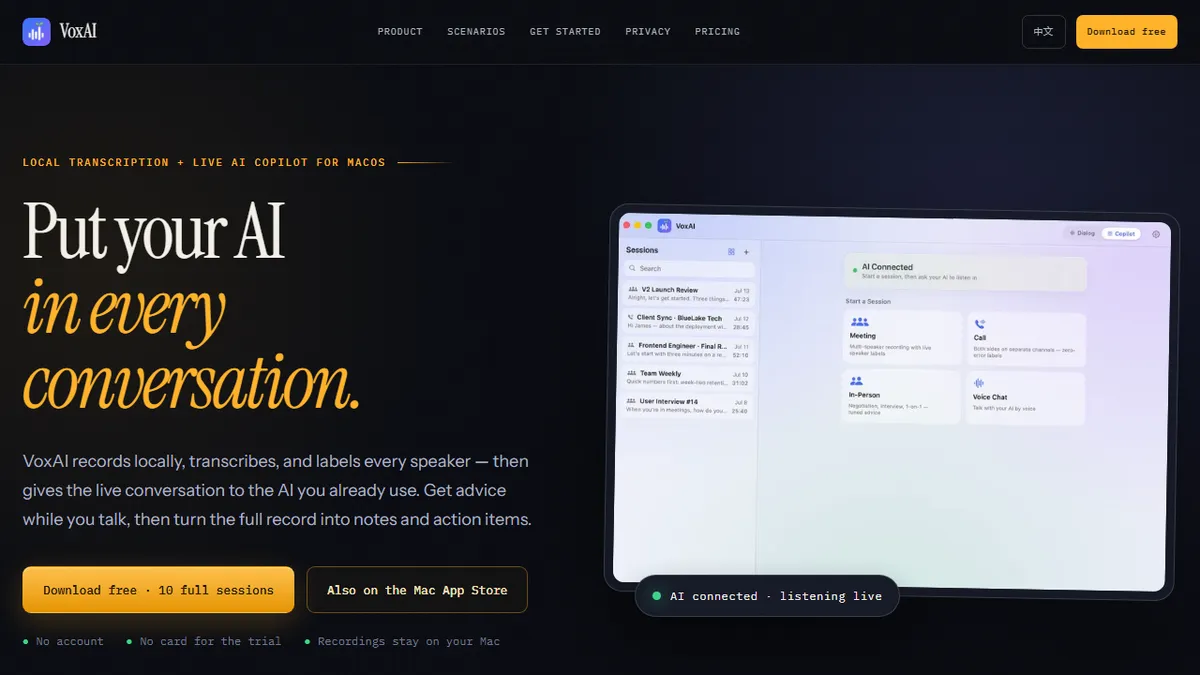
VoxAI is a macOS-native conversation intelligence app that pairs on-device audio capture with live AI assistance. It records any conversation the Mac can hear (video calls, phone audio routed through the machine, in-person meetings via mic, or ambient voice chats), transcribes it in real time with automatic speaker diarisation, and streams the growing transcript to an AI copilot that suggests responses, surfaces context, and flags follow-ups while the discussion is still happening. Four dedicated modes tune the pipeline for meetings, calls, in-person conversations, and voice chats so the transcription and prompting behaviour matches the setting.
After a session ends, VoxAI can generate structured notes, action items, decisions, and summaries, and export the whole conversation as Markdown for pasting into Notion, Obsidian, or a CRM. Recordings and transcripts stay in a permanent local archive on the Mac, which appeals to teams that cannot ship meeting audio to a third-party SaaS. The app exposes its transcript store through a local MCP (Model Context Protocol) server, so any MCP-compatible client — Claude Code, Codex, Cursor, or a custom agent — can query past conversations, pull quotes, and drive downstream automations without a cloud round-trip.
Typical users are executives running back-to-back 1:1s, sales and negotiation professionals who want a live devil's-advocate in their ear, recruiters and interviewers capturing structured notes, researchers doing qualitative interviews, and knowledge workers who simply want searchable memory of every call. Pricing is deliberately unusual for the category: a one-time ~$20 purchase (App Store or direct .dmg) instead of a monthly SaaS seat, with a genuinely usable 10-session free trial that requires no account. That makes it an appealing personal-productivity purchase for individuals who are put off by Otter/Fireflies-style subscriptions, though the trade-off is that some heavy features (post-call AI generation, MCP-driven agents) still lean on external AI providers you configure yourself.
VoxAI is the rare meeting-AI product that respects both your wallet and your hard drive: a flat one-time price, everything stored locally, and an MCP endpoint that turns your conversation history into a data source your own agents can query. It's clearly a solo-developer app rather than an enterprise platform, but for Mac power users already living in Claude Code or Cursor, that's exactly the point.
— The AI Tool Bible editorial team
Pros
- ✅ One-time ~$20 purchase with permanent license for two Macs — no recurring subscription
- ✅ Local-first: recordings and transcripts stay on the Mac in a permanent archive
- ✅ Live AI copilot reads the growing transcript and offers real-time suggestions during the call
- ✅ Automatic speaker diarisation with per-speaker labels
- ✅ Four purpose-built modes for meetings, phone calls, in-person chats, and voice sessions
- ✅ Exposes conversations via a local MCP server so Claude Code, Codex, or Cursor can query them
- ✅ Clean Markdown export for pasting into Notion, Obsidian, or a CRM
- ✅ 10 full-feature sessions free with no signup required
Cons
- ⚠️ macOS only — no Windows, Linux, iOS, web, or mobile client
- ⚠️ Requires wiring up an external AI provider for the copilot and post-call generation
- ⚠️ Solo-app model: no team workspace, shared library, or admin console
- ⚠️ Small indie product from a single developer domain — long-term support is not guaranteed
- ⚠️ MCP integration assumes users are already comfortable with Claude Code / Cursor tooling
- ⚠️ No native CRM, calendar, or Zoom bot integrations — capture is whatever the Mac hears
Pricing (captured )
| Tier | Monthly | Key features |
|---|---|---|
| FREE TRIAL | US$0 |
|
| EARLY BIRD | US$19.90 |
|
Prices change; we show the grid as captured on Oct 28, 2026. Check current pricing on the vendor's site →
Facts
- API available
- Yes
- Free trial
- Yes
- Model used
- Bring-your-own via MCP (Claude, GPT, or other MCP-compatible clients)
- Hacker News
- 1 story · top 3 points · last Jul 25, 2026 · checked Oct 23, 2026
- Earliest Wayback capture
- 2026-07-25 (earliest archived capture of the site, not a launch date)
Where this tool sits
Use cases
Frequently asked
- How much does VoxAI cost?
- VoxAI is a one-time purchase of US$19.90, with a free trial available for 10 sessions that requires no account.
- Does VoxAI store my recordings in the cloud?
- No, recordings and transcripts stay in a permanent local archive on the Mac, keeping data private and off third-party servers.
- Can I use VoxAI with AI coding tools like Cursor or Claude Code?
- Yes, the app exposes its transcript store through a local MCP server, allowing MCP-compatible clients to query past conversations and pull quotes.
- What platforms does VoxAI support?
- VoxAI is exclusively for macOS and does not support Windows, Linux, iOS, or mobile devices.
- Does VoxAI require a subscription for AI features?
- The app itself is a one-time purchase, but you must configure an external AI provider for the live copilot and post-call generation features.