Reve Image
✓ Editorially verified4K image model with direct-editing, sketch-to-image and reference-driven generation, built for design pros.
Design and creative teams who want one tool that spans prompt generation, reference-guided iteration and near-final composition with editable text layers.
Developers who need transparent per-call pricing before signup, open-weights users, or hobbyists who just want a free Discord-style prompt bot.
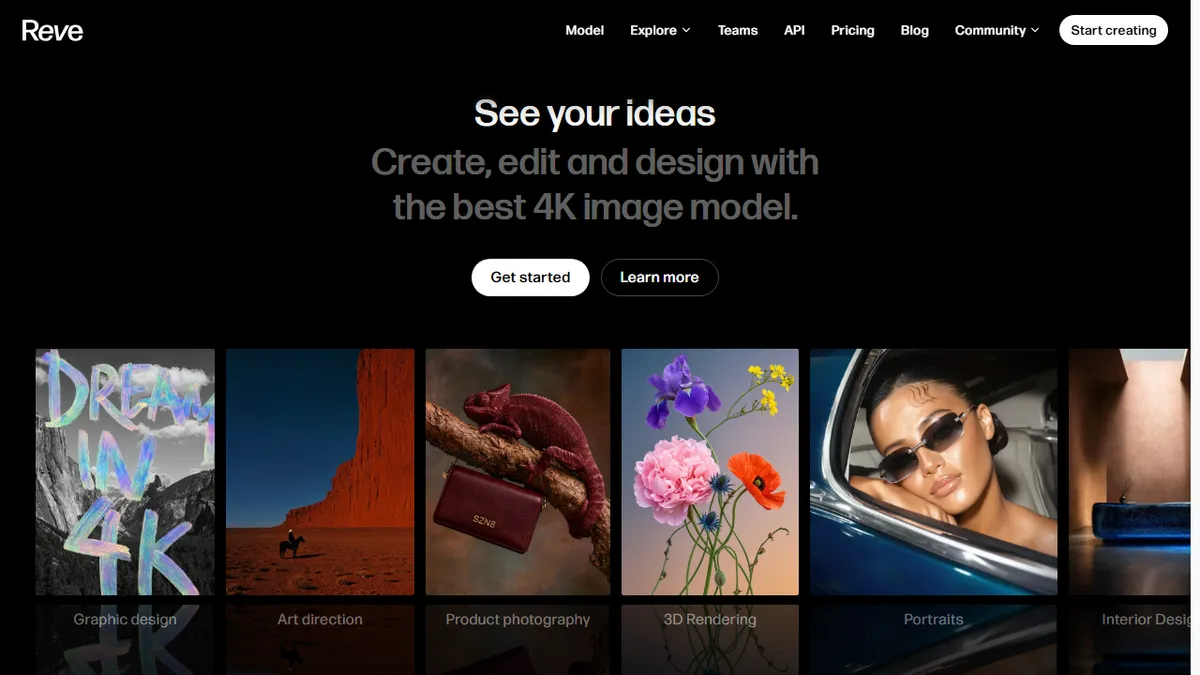
Reve Image is a visual design platform built around an in-house 4K text-to-image model that first surfaced on public image-generation leaderboards in early 2025 (initially under the codename Halfmoon) and quickly climbed near the top of prompt-adherence and typography benchmarks alongside Midjourney, Flux and Ideogram. The product wraps that model in a full editor rather than a bare prompt box: you can generate a scene, then directly move, resize, recolor or swap objects in it; feed a sketch and have it rendered into a finished image; drop in reference images to transfer style, subject or setting; extend or reframe canvases into new aspect ratios; and layer editable text and graphics on top with a Canva-style Live Layers system. Templates and preset visual effects (including user-authored shaders) give teams a repeatable starting point for campaign work. Reve targets creative professionals — art directors, product photographers, 3D and interior visualisers, illustrators, fashion and film pre-viz teams — who need a single tool that spans ideation, iteration and near-final delivery instead of chaining Midjourney → Photoshop → Figma. The web app is the primary surface (app.reve.com), with a separate developer API (api.reve.com) exposing the same model for programmatic use in creative pipelines, batch generation and app integrations. Its calling card is prompt adherence: complex, multi-subject prompts with rendered text tend to come out closer to spec than on most rival models, which is why designers have adopted it for mock-ups, ad concepts and pitch visuals where the brief is precise.
Reve is the most interesting new image model of the 2025 wave — prompt adherence and text rendering are genuinely a step up, and shipping the editor alongside the model is the right bet for professional workflows. The pricing opacity and thin public docs are the main things stopping us calling it a Midjourney replacement outright.
— The AI Tool Bible editorial team
Pros
- ✅ Proprietary 4K model with class-leading prompt adherence and legible in-image typography
- ✅ Direct object-level editing (move, resize, recolor, swap) inside the same canvas as generation
- ✅ Sketch-to-image and reference-based style/subject/location transfer in one workflow
- ✅ Live Layers, templates and reframing bring it close to a full design tool rather than a prompt box
- ✅ Separate API surface for programmatic access and pipeline integration
- ✅ Daily free credits let designers evaluate the model on real briefs before paying
Cons
- ⚠️ Pricing tiers and per-generation API cost are gated behind sign-in, making budgeting hard upfront
- ⚠️ Younger product than Midjourney, Firefly or Ideogram — smaller community, fewer tutorials and prompt libraries
- ⚠️ No open weights and no self-host option; you are locked to Reve's cloud and its content policy
- ⚠️ Editor-heavy UI is overkill if you only want quick one-off generations from a chat prompt
- ⚠️ Commercial-use, indemnification and training-data provenance terms are less clearly documented than at Adobe or Getty
Use cases
Explore related
Compare with similar tools
All in Image Generation →Midjourney
FeaturedThe gold standard for aesthetic AI image generation.
Flux
FeaturedBlack Forest Labs' open-weights image model — rivals Midjourney quality.
Stable Diffusion
Open-source image generation — run anywhere, fine-tune anything.
Nano Banana (Gemini Image)
Google DeepMind's Gemini-powered image generation and conversational editing model family
DALL·E 3
OpenAI's image model — strong on prompt adherence and text-in-image.
Canva Magic Studio
Canva's all-in-one AI creative suite for design, image, video, copy, and presentations