
IntelliBar
Native macOS menu-bar client that talks to every major LLM with your own API keys.
In short
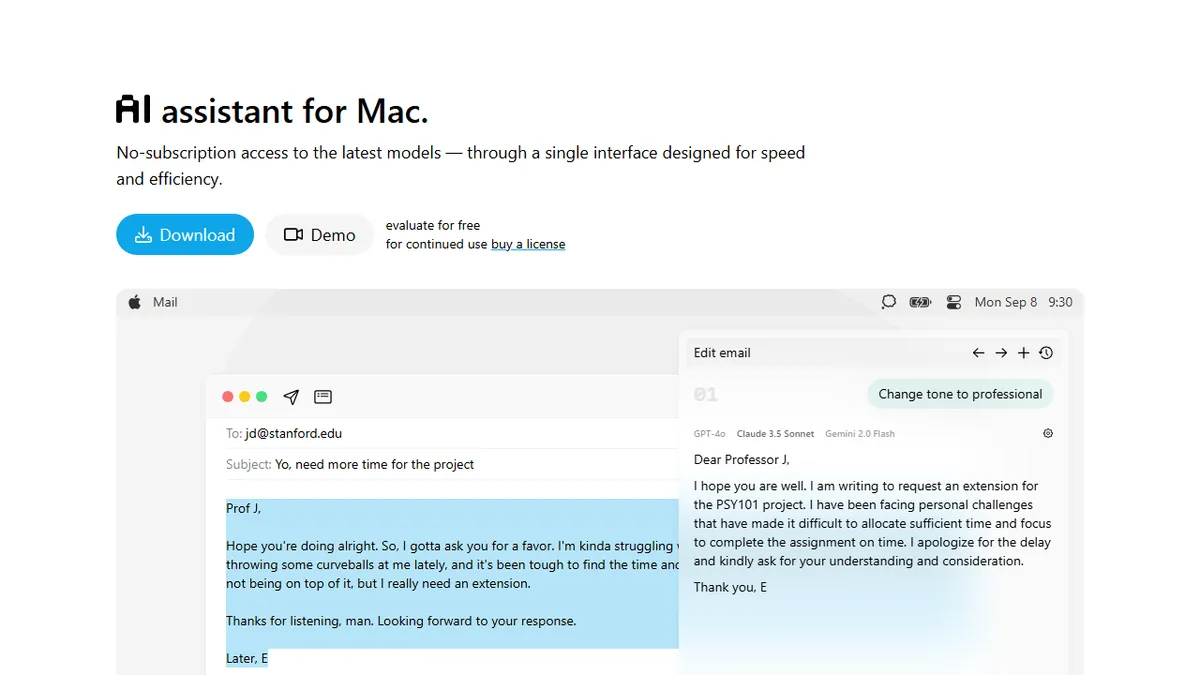
IntelliBar is a native macOS desktop app that provides a keyboard-driven chat interface in the menu bar, routing prompts to major LLMs like GPT-4o, Claude, and Gemini using your own API keys. It is best suited for Mac power users who want to avoid stacking multiple subscriptions by paying per-token directly to providers.
Pick IntelliBar if you're a Mac power user who already has API keys for OpenAI/Anthropic/Google and wants one fast native UI instead of three subscriptions.
Skip it if you're on Windows or Linux, want a hosted team workspace, or prefer flat-rate chat subscriptions over per-token billing.
IntelliBar is a Mac-only desktop app that puts a fast, keyboard-driven chat interface in the menu bar and routes prompts to whichever model you want: GPT-4o, Claude 3.5 Sonnet, Gemini 2.0 Flash, o1, Llama, DeepSeek, or local models via Ollama. It supports model comparison side-by-side, voice input, smart completions, and user-defined slash commands so common prompts (translate, summarize, refactor) are one keystroke away.
The pitch is economic: instead of stacking $20/mo ChatGPT Plus + $20/mo Claude Pro + $20/mo Gemini Advanced, you bring your own API keys and pay per-token, which for light users typically lands under $2/mo total. IntelliBar itself is a one-time license rather than a subscription, with a free evaluation period. That makes it best suited for developers, researchers, and power users who already maintain provider accounts and want a single, fast UI rather than juggling four web tabs.
It is Mac-only with no Windows or Linux build, and there's no team/collaboration layer or hosted backend, which is the point but also the limit. If you want a multi-platform team workspace with shared history and billing, this isn't it. If you live in macOS and just want the fastest possible path from Cmd-Space to a frontier model, it's one of the cleanest options.
A refreshingly unsexy pitch: stop paying three SaaS chatbots, run one Mac app against the APIs, save money. The BYO-key model is honest and the native UI is genuinely snappier than web chat. The Mac-only limitation is real, but for its target audience IntelliBar nails the brief.
— The AI Tool Bible editorial team
Pros
- ✅ Bring-your-own-key model means you avoid stacking $20/mo subscriptions
- ✅ Native Mac app feels faster than Electron/web chat UIs
- ✅ Side-by-side model comparison and Ollama support out of the box
- ✅ Custom slash commands turn repeat prompts into one-keystroke macros
Cons
- ⚠️ macOS only - no Windows, Linux, iOS, or web client
- ⚠️ Requires you to manage API keys and provider accounts yourself
- ⚠️ No team workspace, shared history, or collaboration features
Use cases
Frequently asked
- What models does IntelliBar support?
- It supports GPT-4o, Claude 3.5 Sonnet, Gemini 2.0 Flash, o1, Llama, DeepSeek, and local models via Ollama.
- How is IntelliBar priced?
- It uses a freemium model with a free evaluation period and a one-time license fee. You pay model providers directly via your own API keys rather than through a subscription.
- Is IntelliBar available on Windows or Linux?
- No, IntelliBar is a Mac-only desktop app with no Windows or Linux builds.
Explore related
Compare with similar tools
All in Writing →Claude
FeaturedAnthropic's flagship assistant for long-form writing, analysis, and coding.
GPT-4o
FeaturedOpenAI's multimodal flagship behind ChatGPT.
Gemini Advanced
Google's flagship — strong at math, long context, and Workspace integration.
Llama 3
Meta's open-weights LLM family that put serious frontier-adjacent models in everyone's hands.
Qwen
Alibaba's open-weight foundation model family covering chat, vision, image generation, translation, and safety classification.
Jan
Open-source desktop ChatGPT alternative that runs local LLMs and routes to cloud providers from one app.