
Audify AI
Pay-as-you-go web wrapper around OpenAI's text-to-speech voices.
In short
Audify AI is a pay-as-you-go web interface for OpenAI's text-to-speech models. It lets you use OpenAI voices without managing API keys or subscriptions.
Pick Audify AI if you want OpenAI's TTS voices through a clean UI and would rather top up $2 than wrangle an API key or subscribe to ElevenLabs.
Skip it if you need voice cloning, an API, team workflows, or anything beyond what OpenAI's stock TTS can do.
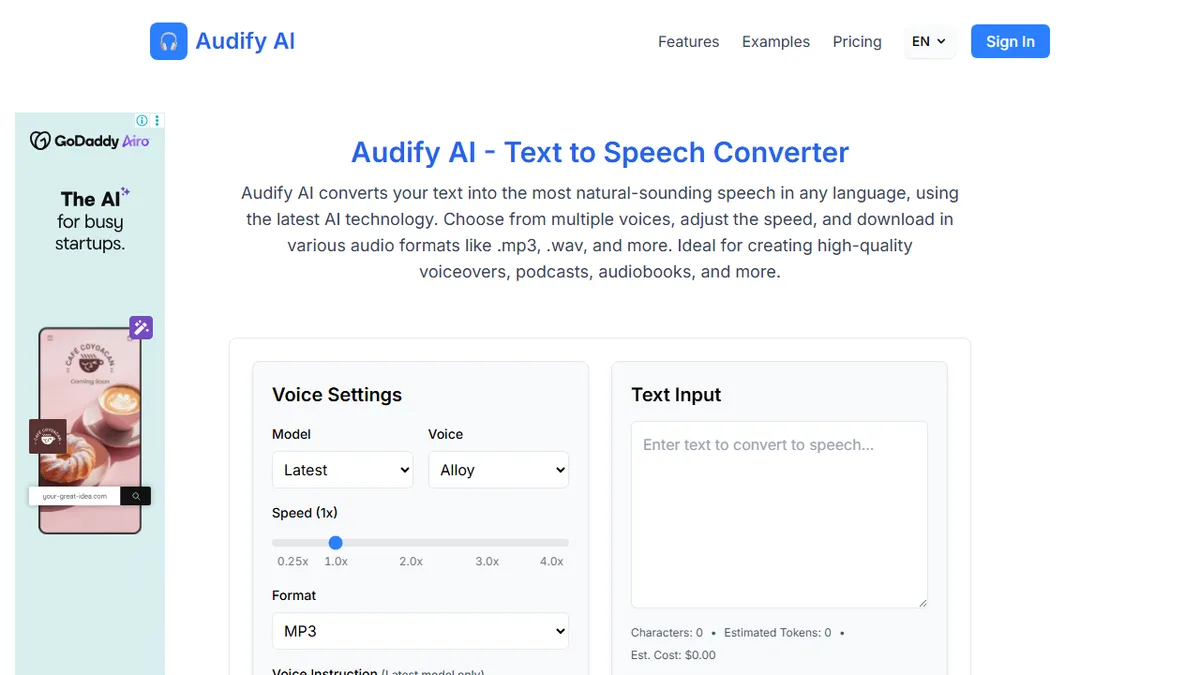
Audify AI is a browser-based text-to-speech front end built on top of OpenAI's TTS models. It exposes the full roster of OpenAI voices (Alloy, Ash, Coral, Echo, Fable, Onyx, Nova, Sage, Shimmer), lets you tweak speaking speed from 0.25x to 4.0x, add voice-direction instructions on the latest model, and export to MP3, OPUS, AAC, FLAC, WAV, or PCM. A live token and cost estimator shows what each render will run before you hit generate.
The pitch is access without committing to a subscription. You can either bring your own OpenAI API key and pay OpenAI directly, or top up an Audify balance from $2 and pay per character. That makes it a reasonable pick for occasional voiceover work (YouTube scripts, podcast intros, accessibility narration) where a $22/month ElevenLabs plan would sit unused. It is not a model lab in its own right; the synthesis, voice library, and quality ceiling all come from OpenAI.
There is no public API, no SDK, and no team/workflow features beyond the single-page generator. If you outgrow casual use, you would step up to OpenAI's API directly or a voice-cloning platform like ElevenLabs or PlayHT.
An honest, no-frills frontend over OpenAI TTS that wins on price for light use. The lack of cloning or an API caps how far it can go, but as a $2-to-start voiceover tool it's hard to argue with for casual creators.
— The AI Tool Bible editorial team
Pros
- ✅ Full set of OpenAI voices with speed and instruction controls
- ✅ Six export formats including lossless WAV and FLAC
- ✅ Pay-as-you-go from $2; no subscription lock-in
- ✅ Live token and cost estimate before each render
Cons
- ⚠️ Thin wrapper over OpenAI TTS, no proprietary models
- ⚠️ No API of its own; not scriptable
- ⚠️ No voice cloning or multi-speaker dialogue
- ⚠️ Small indie operator, limited support guarantees
Use cases
Frequently asked
- How much does Audify AI cost?
- It operates on a freemium model. You can bring your own OpenAI API key for free, or top up an Audify balance starting at $2 to pay per character for usage.
- Does Audify AI support voice cloning?
- No, Audify AI does not support voice cloning. It only provides access to OpenAI's standard TTS voices. If you need voice cloning, you should consider platforms like ElevenLabs or PlayHT.
- Is there an API or SDK for developers?
- No, there is no public API or SDK available. Audify AI is strictly a browser-based front end for casual use. Developers needing programmatic access should use OpenAI's API directly.
- What audio formats can I export?
- You can export audio to MP3, OPUS, AAC, FLAC, WAV, or PCM. The interface also allows you to adjust speaking speed from 0.25x to 4.0x before generating the file.
- Is Audify AI suitable for team workflows?
- No, it lacks team or workflow features beyond the single-page generator. It is designed for individual, occasional use. If you outgrow casual use, you should step up to OpenAI's API or other platforms.
Explore related
Compare with similar tools
All in Audio →ElevenLabs
FeaturedThe gold standard for AI voice cloning and TTS.
Suno
FeaturedText-to-song AI — full vocal tracks from a prompt.
Udio
Suno's main rival for AI-generated full songs.
AssemblyAI
Speech-to-text API with diarisation, summarisation, and topic detection.
Chorus by ZoomInfo
Enterprise conversation intelligence bundled with ZoomInfo's B2B data graph
Whisper
OpenAI's open-source speech-to-text — the de-facto baseline.