Agentmux
iOS command center for SSH, tmux, and AI coding agents
In short
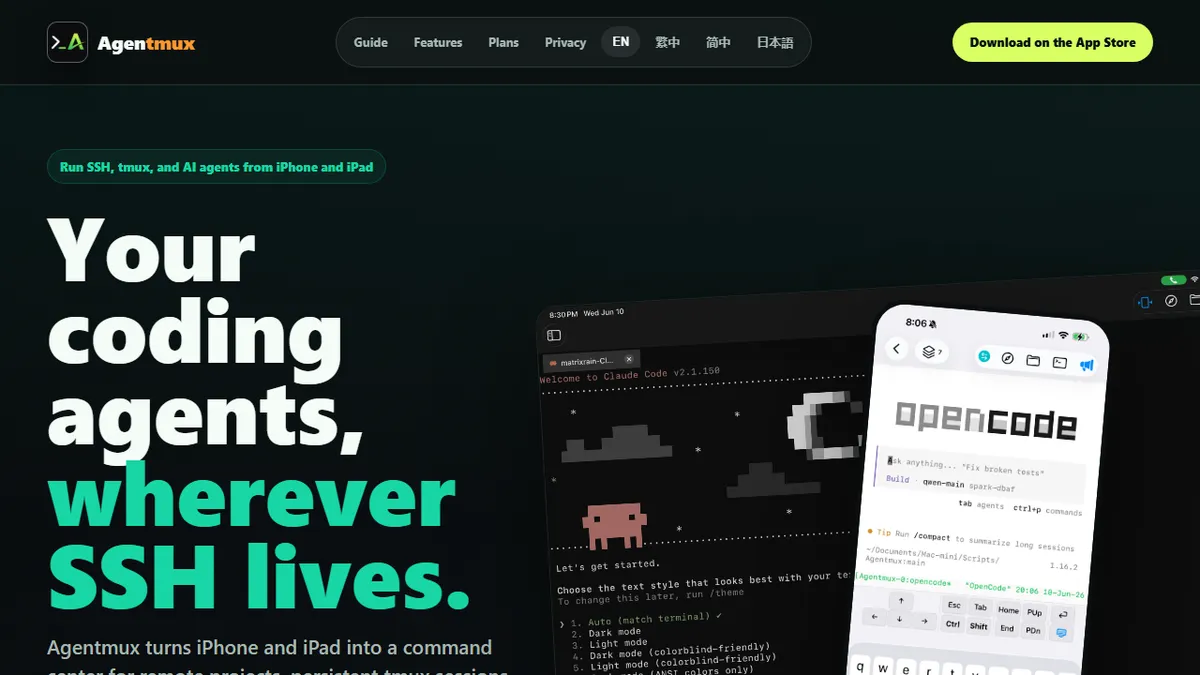
Agentmux is an iOS application that serves as a mobile front-end and session manager for remote development workflows driven by AI coding agents. It allows developers to supervise long-running Claude Code, Codex, or Gemini CLI sessions via SSH and tmux persistence from an iPhone or iPad. The tool is best suited for solo developers and small ops teams who need to manage multiple servers and inspect code remotely without a laptop.
Solo developers and small ops teams who already drive Claude Code, Codex, or Gemini CLIs on remote servers and want a first-class iOS interface to babysit and steer those agents from a phone or iPad.
Android users, teams that need a shared web dashboard, and anyone expecting a hosted agent service — Agentmux is a mobile front-end, not a model provider.
Agentmux is an iOS app that turns an iPhone or iPad into a mobile command center for remote development work driven by AI coding agents. It wraps SSH, tmux, and one-tap launchers for Claude Code, Codex, Gemini, and OpenCode into a touch-friendly interface, so developers can supervise long-running agent sessions from the couch, a commute, or a phone in bed without rebuilding shell context every time the connection drops. Because it leans on tmux for persistence, an agent kicked off on a server keeps running when the iPhone sleeps or the network switches from Wi-Fi to LTE, and reattaches cleanly on the next open. The app pairs the terminal with a remote file browser that renders syntax-highlighted code, plus (on the Pro tier) a remote code editor that saves over SSH, a workspace concept for juggling multiple servers, and utilities for file history, branch switching, and batch operations. It is not a hosted agent service — Agentmux does not run models itself. Instead it assumes you already have accounts and CLIs for the agent providers installed on your dev boxes, and it acts as a well-designed mobile front-end and session manager on top of them. The typical workflow is: SSH into your VPS or workstation from the app, launch a Claude or Codex session in a named tmux window, watch it work, jump into a sibling shell to inspect diffs or run tests, and edit the odd file directly from the phone before detaching. A 14-day full-feature trial makes it low-risk to see whether phone-first agent supervision fits your rhythm.
A refreshingly focused product: instead of another hosted agent platform, Agentmux accepts that most serious developers already have Claude Code or Codex on a VPS and just need a decent way to check on them from a phone. The tmux persistence layer is the right architectural bet, and the free tier is generous enough to actually validate the workflow before paying.
— The AI Tool Bible editorial team
Pros
- ✅ One-tap launch for Claude, Codex, Gemini, and OpenCode CLIs alongside a normal shell
- ✅ tmux-backed persistence survives network changes, sleep, and Wi-Fi-to-LTE handoffs
- ✅ Touch-friendly terminal UI purpose-built for iPhone and iPad rather than a generic SSH client
- ✅ Remote file browser with syntax highlighting for quick code review from mobile
- ✅ Pro tier adds a remote SSH editor, multi-server workspaces, and branch/file history tools
- ✅ Free tier is genuinely usable for single-server work, not just a demo
- ✅ 14-day full-feature trial exposes every Pro feature before committing
Cons
- ⚠️ iOS-only — no Android, macOS, or web client
- ⚠️ Does not run its own models; you must bring and configure the underlying agent CLIs on your own servers
- ⚠️ Pro pricing is not clearly published on the marketing site, making budgeting harder
- ⚠️ Small independent app with limited public track record versus established mobile SSH clients
- ⚠️ Typing serious code on a phone remains awkward regardless of UI polish, limiting deep sessions
- ⚠️ No documented public API or open-source code for extension or auditing
Use cases
Frequently asked
- What AI coding agents does Agentmux support?
- Agentmux supports one-tap launchers for Claude Code, Codex, Gemini, and OpenCode. It acts as an agent-agnostic front-end, assuming you already have the respective CLIs installed on your remote servers.
- Does Agentmux run AI models itself?
- No, Agentmux does not run models or provide a hosted agent service. It functions as a mobile interface and session manager for agents you already have accounts for and have installed on your dev boxes.
- What is included in the free tier versus Pro?
- The free tier offers single-server SSH, persistent sessions, and core terminal features. The Pro tier adds multi-server workspaces, custom agents, remote editing, advanced file/branch tools, and batch operations.
- Is Agentmux available on Android or web?
- No, Agentmux is iOS-only and does not have an Android, macOS, or web client. It is specifically designed for iPhone and iPad users.
Explore related
Compare with similar tools
All in Agents →LangGraph
FeaturedStateful, graph-based agent orchestration from LangChain.
CrewAI
FeaturedPython framework for multi-agent orchestration.
Ernie Bot
Baidu's Mandarin-first ChatGPT rival, powered by the ERNIE model family
Moveworks
The enterprise AI assistant that searches, answers, and takes action across your business systems
AWS Bedrock
Build and scale generative AI applications with foundation models
Claude Agent SDK
Anthropic's official SDK for building autonomous Claude agents.