Reve
✓ Editorially verifiedImage generation that treats pictures as editable code, not one-shot diffusion outputs.
In short
Reve 2.0 generates editable 4K images using a code-based planning stage, allowing precise element adjustments without full regeneration.
Pick Reve if you need precise, editable 4K compositions with reliable in-image text and you iterate on the same scene rather than rolling new ones.
Skip it if you want open weights, a deep LoRA/style ecosystem, or a transparent per-image price you can budget against.
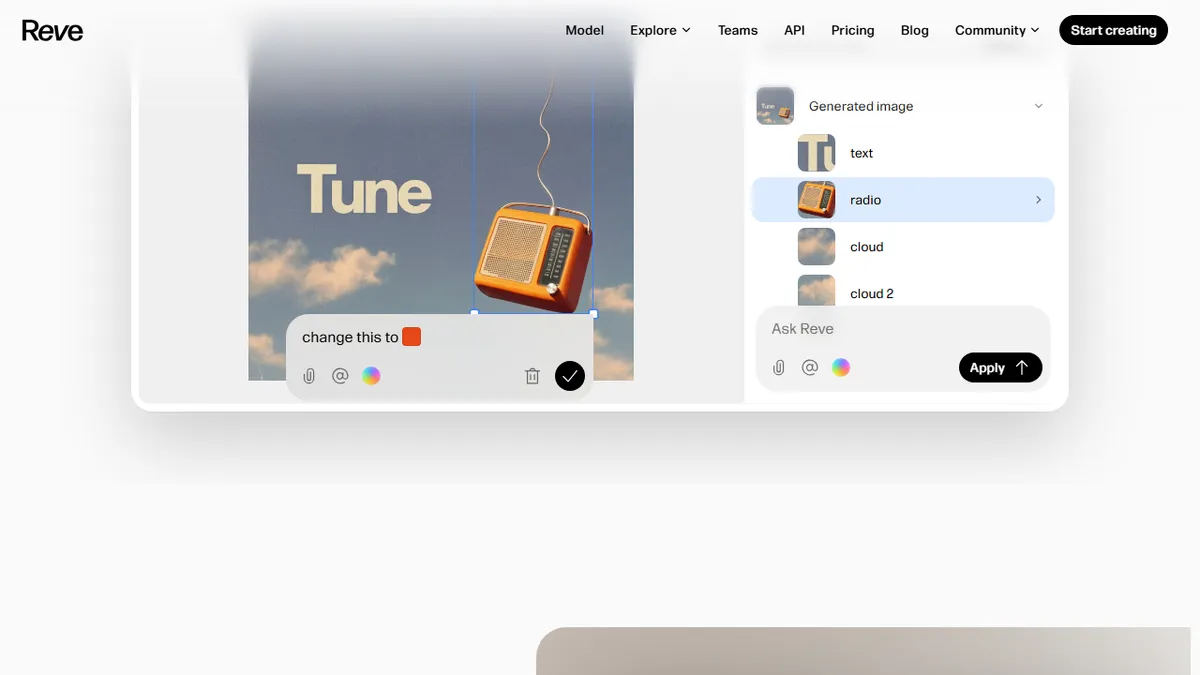
Reve (Reve 2.0) is an AI image platform that splits generation into two stages: an LLM-driven planning phase that lays out the scene as a structured, code-like representation, and a diffusion rendering phase that turns that plan into a native 4K (16 MP) image. Because the intermediate scene is code rather than an opaque latent, individual elements can be moved, restyled, or re-rendered without the usual prompt-roulette of pure diffusion tools.
The pitch is precision and iteration. Reve targets designers, photographers, and content teams who hit a wall with Midjourney/SDXL-style workflows where small edits force full regenerations and text rendering drifts. The Palo Alto team also leans into an "agent-native" angle: because images carry a machine-readable structure, downstream AI systems can reason about composition and make targeted edits. Pricing is not listed publicly on the app landing, and the editor lives at reve.com with a hands-on direct-manipulation UI.
This is a model + product company, not a wrapper. They appear to train their own autoregressive planner and diffusion renderer in-house, and ship them through their own editor rather than via a third-party UI.
Reve is one of the more interesting bets in image gen because it refuses the single-shot diffusion paradigm and treats an image as a structured document you can edit. If the planner holds up across complex scenes, this is the kind of architecture agent workflows actually need. The opacity around pricing is the main thing keeping us cautious.
— The AI Tool Bible editorial team
Pros
- ✅ Native 4K (16 MP) output without a separate upscaler pass
- ✅ Code-like scene representation enables targeted edits, not full re-rolls
- ✅ Strong text rendering and explicit compositional control
- ✅ Agent-friendly structured output suits automated pipelines
Cons
- ⚠️ Pricing and quotas are not transparently published on the site
- ⚠️ Smaller community and prompt library than Midjourney or SDXL ecosystems
- ⚠️ Closed model with no self-host or weights option
Use cases
Frequently asked
- How much does Reve cost?
- Reve operates on a freemium model, but specific pricing details are not publicly listed on the app landing page. You cannot currently budget against a transparent per-image price.
- What makes Reve different from Midjourney or SDXL?
- Reve uses a two-stage process: an LLM planner creates a code-like scene structure, then a diffusion renderer produces the image. This allows individual elements to be edited without full regeneration.
- Can I edit specific parts of an image?
- Yes. Because the intermediate scene is code rather than an opaque latent, individual elements can be moved, restyled, or re-rendered directly. This supports iterative design on the same scene.
- Does Reve handle text rendering well?
- Yes, Reve is designed for reliable in-image text rendering. It targets users who experience text drift in pure diffusion tools, offering precise control over text elements within compositions.
- Is Reve open-source or does it have a LoRA ecosystem?
- No. Reve is a model + product company that trains its own in-house planner and renderer. It does not offer open weights or a deep LoRA/style ecosystem, which are reasons to skip it.
Explore related
Compare with similar tools
All in Image Generation →Midjourney
FeaturedThe gold standard for aesthetic AI image generation.
Flux
FeaturedBlack Forest Labs' open-weights image model — rivals Midjourney quality.
Stable Diffusion
Open-source image generation — run anywhere, fine-tune anything.
Nano Banana (Gemini Image)
Google DeepMind's Gemini-powered image generation and conversational editing model family
DALL·E 3
OpenAI's image model — strong on prompt adherence and text-in-image.
Canva Magic Studio
Canva's all-in-one AI creative suite for design, image, video, copy, and presentations