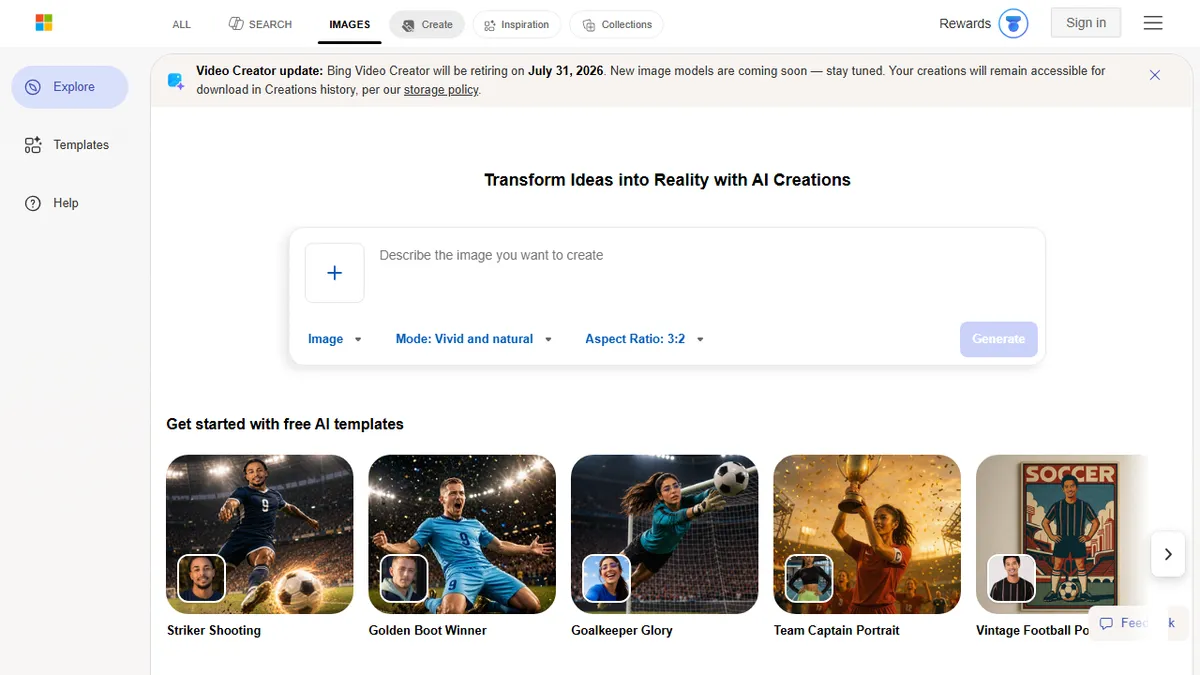
Bing Image Creator
✓ Editorially verifiedMicrosoft's free text-to-image generator built into Bing, with daily boost credits and mobile video.
In short
Bing Image Creator is a free Microsoft tool for generating images and videos from text. It offers daily fast credits and basic editing without requiring a subscription or API setup.
Pick Bing Image Creator if you want a zero-cost, zero-setup way to generate images from text prompts for casual, social, or one-off creative work.
Skip it if you need API access, fine-tuning, uncensored output, or a reproducible production pipeline.
Bing Image Creator is Microsoft's consumer-facing AI image generator, embedded directly into Bing search and the Bing mobile app. It turns text prompts into images across multiple aspect ratios (1:1, 7:4, 4:7, 3:2, 2:3) and offers basic post-generation editing like background removal, retouching, and outpainting. The mobile app additionally exposes a text-to-video mode with 9:16 and 16:9 outputs and selectable speed tiers.
What makes it interesting is the price tag: it is genuinely free, with 10 fast-mode generations per day plus unlimited slower-queue renders, and additional boosts earnable through Microsoft Rewards. That makes it one of the easiest no-friction entry points to a frontier image model for casual users, hobbyists, and anyone who doesn't want to wire up an API key or pay a subscription. Historically it ran on DALL-E 3; Microsoft has been transitioning to an updated in-house model, and the underlying engine is treated as a moving target rather than a versioned product.
The trade-off is control. There's no API on this surface (developers should go to Azure OpenAI instead), no LoRA or fine-tuning, and the safety filter is aggressive enough that named people, brands, and edgier styles are routinely refused. It also runs through a Microsoft account and Bing's UI, so it's not a serious choice for production workflows, batch generation, or anything you need to script.
Bing Image Creator is the easiest free on-ramp to a frontier image model, full stop. The filter is heavy-handed and you're at the mercy of whatever Microsoft swaps in under the hood, but as a casual sketchpad it's hard to beat at the price. Developers should treat Azure OpenAI as the real surface and use Bing for quick mockups.
— The AI Tool Bible editorial team
Pros
- ✅ Genuinely free with daily fast-generation credits
- ✅ No setup beyond a Microsoft account
- ✅ Built-in editing tools (background removal, retouch, expand)
- ✅ Mobile app adds text-to-video generation
Cons
- ⚠️ No public API on this surface; use Azure OpenAI instead
- ⚠️ Aggressive content filter blocks many people, brands, and styles
- ⚠️ No fine-tuning, LoRA, or batch/scripted workflows
- ⚠️ Underlying model versioning is opaque and shifting
Use cases
Frequently asked
- How much does Bing Image Creator cost?
- It is completely free. You receive 10 fast generations daily, unlimited slow-queue renders, and can earn extra boosts through Microsoft Rewards. There are no subscription fees or hidden costs for standard usage.
- Can I use Bing Image Creator for commercial projects?
- The documentation does not specify commercial licensing terms. It is described as suitable for casual, social, or one-off creative work. For production pipelines, batch generation, or scripted workflows, it is not recommended due to lack of API access.
- Does Bing Image Creator have an API for developers?
- No, there is no API available on this consumer surface. Developers needing programmatic access or integration should use Azure OpenAI instead. The tool is designed for manual use via the Bing search interface or mobile app.
- What types of content can I generate?
- You can generate images in various aspect ratios and short videos in 9:16 or 16:9 formats. The mobile app supports text-to-video with selectable speed tiers. Basic post-generation editing like background removal and retouching is also included.
- Are there restrictions on what I can create?
- Yes, the safety filter is aggressive. It routinely refuses requests involving named people, brands, or edgier styles. It is not suitable for uncensored output or fine-tuning, making it less flexible than some other AI image tools.
Explore related
Compare with similar tools
All in Image Generation →Midjourney
FeaturedThe gold standard for aesthetic AI image generation.
Flux
FeaturedBlack Forest Labs' open-weights image model — rivals Midjourney quality.
Stable Diffusion
Open-source image generation — run anywhere, fine-tune anything.
Nano Banana (Gemini Image)
Google DeepMind's Gemini-powered image generation and conversational editing model family
DALL·E 3
OpenAI's image model — strong on prompt adherence and text-in-image.
Canva Magic Studio
Canva's all-in-one AI creative suite for design, image, video, copy, and presentations