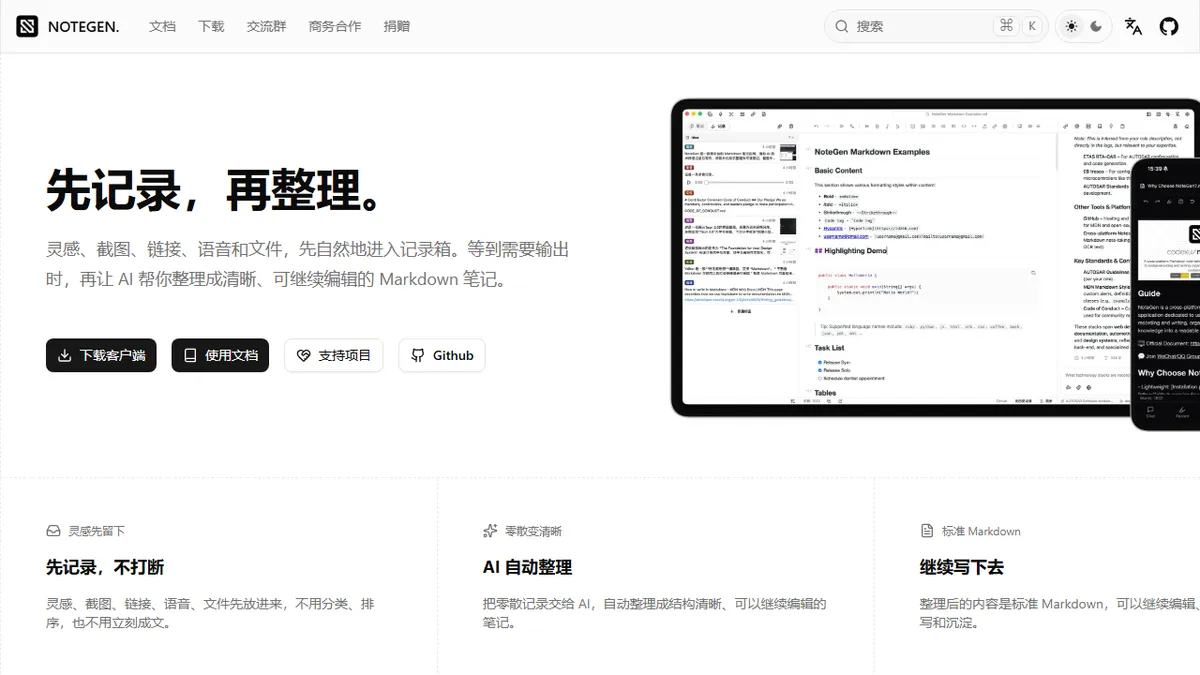
NoteGen
Open-source local-first note-taking app that uses AI to turn raw clippings into structured Markdown.
In short
NoteGen is a free, open-source tool that captures raw content and uses AI to organize it into editable Markdown notes locally. It is best for individuals who want AI-driven note organization with local data storage and no mandatory account.
Pick NoteGen if you want an AI-organized notes app that stays local, free, and lets you swap in your own LLM keys.
Skip it if you need a polished team workspace, hosted collaboration, or an enterprise-grade SaaS with support contracts.
NoteGen is a free, open-source (GPL-3.0) note-taking application that combines frictionless capture with AI-driven organization. Users dump raw content into an inbox (text, screenshots, links, voice, files, tasks), and the app uses configurable AI models to merge it into clean, editable Markdown notes via customizable templates. The whole pipeline runs locally with no required login, and cross-device sync is handled through GitHub, Gitee, GitLab, Gitea, WebDAV, or S3.
It is aimed at individuals who want the speed of a quick-capture app like Bear or Apple Notes plus the organization-by-AI promise of Mem or Reflect, but without surrendering data to a SaaS. NoteGen ships built-in free models (Qwen3-8B, BAAI/bge-m3 for embeddings, GLM-4.1V-9B-Thinking for image understanding) and lets users plug in their own API keys for other providers. Costs are zero; it is genuinely free, not freemium.
The AI workbench supports context-aware rewriting, RAG-style retrieval over your own notes, and multi-step task agents. MCP support means you can connect it to external tools and services. With 12k+ GitHub stars, it has real momentum, though the UI polish and ecosystem maturity still trail commercial competitors.
A genuinely useful entrant in the AI-notes space that respects your data and your wallet. The bundled free models won't outdo GPT-class APIs, but BYO keys plus MCP make it surprisingly extensible. Treat it as an Obsidian-adjacent option with native AI capture, not a Notion replacement.
— The AI Tool Bible editorial team
Pros
- ✅ Truly free and open source under GPL-3.0
- ✅ Local-first storage with no mandatory account
- ✅ Multi-modal capture: text, screenshot, voice, files
- ✅ Bring-your-own-model support plus bundled free models
- ✅ Cross-device sync via Git providers, WebDAV, or S3
Cons
- ⚠️ UI and polish lag behind commercial notes apps
- ⚠️ Self-managed sync setup is fiddlier than turnkey SaaS
- ⚠️ Bundled free models are weaker than frontier APIs
- ⚠️ Smaller ecosystem and plugin library than Obsidian
Use cases
Frequently asked
- Is NoteGen free to use?
- Yes, NoteGen is free and open source under the GPL-3.0 license. It includes bundled free models, and users can optionally bring their own API keys for paid LLMs.
- How does NoteGen handle data privacy?
- The app runs locally with no required login, keeping data on your device. Cross-device sync is managed by the user through Git providers, WebDAV, or S3.
- What types of content can I capture in NoteGen?
- Users can dump raw content including text, screenshots, links, voice, files, and tasks into an inbox for AI processing.
- Can I use my own AI models with NoteGen?
- Yes, while it ships with built-in free models like Qwen3-8B, users can plug in their own API keys to use other providers.
- Is NoteGen suitable for team collaboration?
- No, it is not recommended for teams needing a polished workspace or hosted collaboration, as it is designed for individual local-first use.
Explore related
Compare with similar tools
All in Writing →Claude
FeaturedAnthropic's flagship assistant for long-form writing, analysis, and coding.
GPT-4o
FeaturedOpenAI's multimodal flagship behind ChatGPT.
Gemini Advanced
Google's flagship — strong at math, long context, and Workspace integration.
Llama 3
Meta's open-weights LLM family that put serious frontier-adjacent models in everyone's hands.
Qwen
Alibaba's open-weight foundation model family covering chat, vision, image generation, translation, and safety classification.
Jan
Open-source desktop ChatGPT alternative that runs local LLMs and routes to cloud providers from one app.